  |
GoFiler Legato Script Reference
Legato v 1.6l Application v 6.6b
|
| Table of Contents | < < Previous | Next >> |
Chapter Eight — Data Functions (continued)
The Data Sheet Object is an underlying component to a number of views and data controls within the application. It is essentially a mini spreadsheet/database specifically designed to control a matrix of data. Unlike a simple table of strings within Legato, a Data Sheet Object manages a collection of cells that can contain a wide variety of data.
Data Sheet Objects can be used without controls and views and can be a convenient way to work with complex table data. When working windows employing Data Sheets, scripts use high-level function since they will manage undo as well as many other high-level functions.
A Data Sheet Object can also be useful for managing large chunks tabular data and interchanging such data with HTML, CSV, text and Excel.
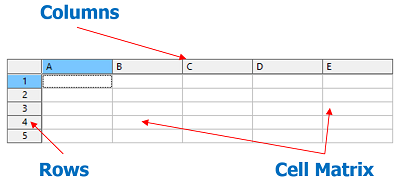
The sheet is essentially a two-dimensional array of cells (table). The above is a visual representation of a Data Sheet Object as part of a Data Control or Data View. The control can be part of a dialog control while many view employ Data View as a basic that will then employ multiple Data Sheets Objects.
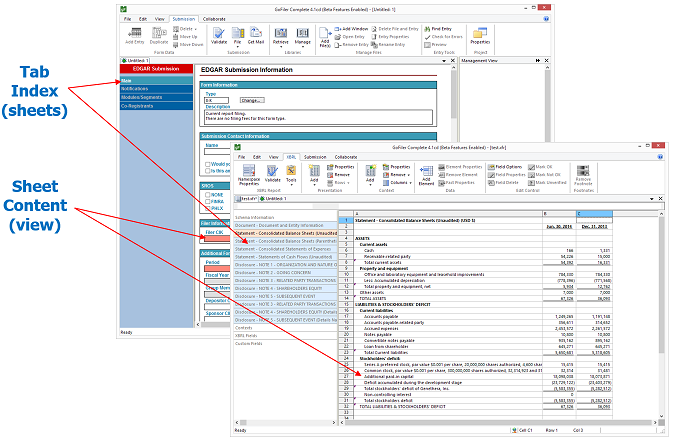
In each of the above examples, the underlying data management object is the Data Sheet. Each tab of the form or workbook is a Data View which in turn relies on a Data Sheet Object. As a control:
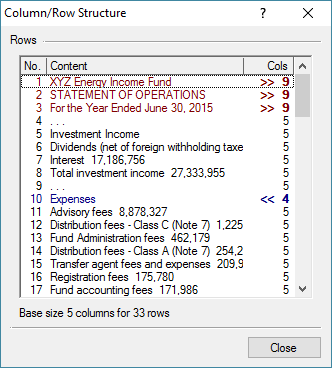
With the Data Control, a single Data Sheet supports the window.
A principal difference in the characteristics between a simple string table and a data sheet is that data sheets allows cells (elements) to be merged (spanned). Cells can also have many more attributes ranging from names, styles, typing and other characteristics. Further, optional column and row array information can be used to control the cell matrix. Finally, while a Legato array can have key names, a Data Sheet can have row and column names and each cell can have a name.
The Data Sheet object stores the information as 8-bit null terminated strings, normal as UTF-8 encoding. While object does not concern itself with the content, Data Control and Data View treat the content as UTF-8. The maximum size of the data is 2MB.
Each cell can have the following data components:
Display Data — This is generally what is being display on the screen or the cell’s data. Depending on the type of cell, it can be as simple as 1 or 0 for checkbox or up to 2MB text such as of HTML data. This is considered the cell’s text.
Aggregate Attributes — Up to 2MB total of fields supporting the cell. So far as the actual Data Sheet Object, the only field that is directly referenced and used is the cell name. All other fields are arbitrarily named to support activities of the function that rely on the Data Sheet Object. The fields are as follows:
Field Type Data — Used to support complex cell display types.
Edit/Native Data — The native data as entered. for reformatted cells, the text is the displayed data, this value would be the raw data. For example, the display may be ‘50%’ while the raw data is ‘.5’.
Cell Name — The cell’s name. Not that uniqueness is not enforced by the Data Sheet Object.
Description — A general description.
Tip — A general tip. Can be used for hover popup windows.
Comment — A general comment.
Review — Review information.
Caller Private A — General data.
Caller Private B — General data.
Script Events — Events, if enabled by the view.
Flags (Type) — Control flags including the cell’s type;
Style Index — An index to the Data Sheet Style Table.
Cell Dimensions — The measured height and width of the cell’s display content.
Cell Span Data — Spanning information for columns and rows.
A Data Sheet object is accessed via a Data Sheet Object Handle which can be retrieved from a related objects such as Data Controls or Data View windows. A Data Sheet can also be created using the DataSheetCreate function.
Obviously, as a spreadsheet database, the Data Sheet contains rows and columns. However, the rows and columns can also have arrays to control column and row characteristics. For certain objects, such as one obtained from a Data View window, the Data Sheet will always have column and row array.
The column array gives each column physical display characteristics such as width and visibility. If unnamed, columns are lettered from A to ZZZ and rows from 1 to x (like a spread sheet) but are accessed programmatically by zero-based index position.
Display dimensions are not relevant to the Data Sheet Object but are used by any display object using a data sheet. The dimensions are measured in screen pixels but can be specified as CSS style units. It is up to the display window to interpret and adjust such dimensions.
Each entry in the column array has flags that control certain behaviors, these are as follows:
Each entry in the row array has flags that control certain behaviors, these are as follows:
Each cell is an x/y or row/col position in the cell matrix. When a sheet is created, the matrix exists but actual cell records may not. A cell is considered null if there is no data associated with it. As soon as any property or data is applied to a cell, a cell record is created. When a null cell is accessed, the data return will be the same as if all data was reset. Accessing a null cell does not create a cell record.
The cell record contains three main pieces of data: display data, cell attributes and cell type. The Data Sheet object generally is not concerned with the cell contents except in the case of controls such as combo boxes which require cell object data. The display data is usually the text that is displayed. If the data sheet is treated as a simple matrix, a script may simply be concerned with the display data. Display data can also be very simple, such as 0 or 1 for a check box. The legend of the checkbox is stored as an attribute.
There are numerous attributes that can be associated with a cell. These include the edit data, cell name, tip, comments, extended type data and private information. In addition, the display style of the cell can be specified as an index to a style table.
Finally, the cell type specifies to the display window how the cell is displayed and edited.
Cell flags are defined as follows:
Display data flags are as follows (note these are context sensitive):
A style index is stored as part of a Data Sheet Object. The styles can be edited, added and enumerated. Certain views such as the raw Data View will allow the style information to be edited by the user. In other cases, such as various EDGAR views, the style information shapes how that display appears to the user.
As part of the base functionality of a data sheet, edit transaction and undo management is supplied. When enabled, certain actions to the data sheet can be undone. When the Data Sheet is used with a view, the editing should be performed via the view which will handle its own edit management.
Page revised 2026-11-16
| Table of Contents | < < Previous | Next >> |
© 2012-2026 Novaworks, LLC. All rights reserved worldwide. Unauthorized use, duplication or transmission is prohibited by law. Portions of the software are protected by US Patents 10,095,672, 10,706,221 and 11,210,456. Novaworks, GoFiler™ and Legato™ are registered trademarks of Novaworks, LLC. EDGAR® is a federally registered trademark of the U.S. Securities and Exchange Commission. Novaworks is not affiliated with or approved by the U.S. Securities and Exchange Commission. All other trademarks are the property of their respective owners. Use of the features specified in this language are subject to terms, conditions and limitations of the Software License Agreement.